Claude SEO in 2026: Skills, MCP Servers and Real Data
 Paul VengeonsCo-Founder & SEO Consultant
In short
Claude alone reasons well but cannot see your clicks, positions or search volumes: it invents them. A Claude SEO skill gives it a process, an MCP server gives it your data. ChatSEO's MCP connects your Search Console and GA, plus SERP, volume and backlink data, with one command in Claude Code.
Claude makes up the numbers it cannot see. ChatSEO connects your Search Console to Claude and tells you what to fix.
Summarize this blog post with:
Which AI SEO agent suits you?
Answer 5 questions to find your ideal solution
Most Claude SEO advice stops at "paste your keywords into the chat". That is a prompt, not a workflow. The gap between a fun demo and a real Claude SEO process is one question: can Claude see your actual data?
Below is the full map: what Claude alone can do, what a Claude SEO skill adds, which MCP servers bring real numbers, how to connect ChatSEO's server in two minutes, and the prompts worth stealing. We use this exact setup every day: the ChatSEO team runs its own SEO from Claude Code with the ChatSEO MCP server connected.
🧭 The five ways to use Claude for SEO
| How you use Claude | What data it sees | Setup time | Best for |
|---|---|---|---|
| Claude alone (chat) | Only what you type | 0 minutes | Drafts, rewrites, schema, content thinking |
| Claude Projects with pasted exports | Whatever CSV you paste | 10 to 15 minutes per session | One-off audits, client reports |
| Claude Code skills | Local files and scripts you point it at | 5 to 30 minutes | Repeatable processes, on-page checks, briefs |
| Third-party MCP servers (DataForSEO, Semrush, Ahrefs) | Their own databases and APIs | 15 minutes plus API billing | Raw SERP, volume and backlink data at scale |
| ChatSEO MCP | Your own Search Console and GA data, plus SERP, volume and backlink data | 2 minutes | Weekly decisions on your own site |
Skills add process, MCP servers add truth. Everything else on this page follows from that.
🧠 1. What Claude alone can and cannot do
Claude is a very good SEO analyst and a very bad witness. It will reason about search intent, entity coverage and internal linking for hours. What it cannot do is look at your site.
Where Claude alone genuinely shines, no data needed:
- Turning a rough topic into a brief with headings, questions and entities.
- Rewriting titles and meta descriptions you paste in.
- Explaining why two pages might be cannibalizing each other.
- Writing JSON-LD, redirect maps, hreflang notes.
- Reading a crawl export you paste and spotting patterns.
Where it fails, every single time:
- It does not know your impressions, clicks or positions.
- It does not know live search volume.
- It cannot crawl your site or check indexation.
- It has no backlink index.
- It fills every gap with a confident guess.
A concrete example: "claude seo" gets about 590 searches a month in the US (DataForSEO, October 2026). Ask Claude alone for that number and you get a plausible figure delivered in a confident tone, which is worse than no answer. So the fix is not a better prompt, it is a connection. There are two kinds: skills and MCP servers.
🛠️ 2. Claude Code skills for SEO
A skill is a folder of instructions, scripts and resources that Claude loads when a task matches. Anthropic introduced Agent Skills in October 2025, and the same skill runs in the Claude apps, in Claude Code and through the API (Anthropic). A Claude SEO skill gives Claude a repeatable process, not data.
There are already many SEO skills: open-source repos on GitHub, vendor skills from SEO suites, single-purpose audit skills. What a good one buys you:
- A fixed process: same checks, same output format, every time.
- Your rules encoded once, instead of retyped in every prompt.
- Code execution for parsing crawls, sitemaps and log files.
- Less context burned on explaining how you want the work done.
What it does not buy you is data about your own site. Most published SEO skills work from SERP data or from files you hand them, not from your Search Console. A skill makes Claude consistent, an MCP server makes Claude informed. You want both, in that order.
🔌 3. MCP servers that give Claude real SEO data
The Model Context Protocol is an open standard that connects AI clients to external tools and data, described by its authors as a USB-C port for AI applications (Model Context Protocol). Claude Code and Claude Desktop both support it, which is why most SEO vendors now ship a server.
For SEO, the useful split is by data source:
- Google Search Console MCP: your own clicks, impressions, CTR and average position, query by query. This is the only source that describes your site rather than the market.
- DataForSEO MCP: raw SERP, keyword and backlink data, billed per API call (DataForSEO).
- Semrush MCP: your Semrush subscription exposed as tools, so Claude can query keyword and domain data you already pay for (Semrush).
- Ahrefs MCP: the same idea on Ahrefs data, useful for link and content gap work.
- Platform servers (rank trackers, crawlers, suites): their own stored projects, often with your history.
Choose your MCP server by the question you ask most: "what is happening on my site" (Search Console based) or "what is happening in my market" (third-party API). If you are still comparing suites, our comparison of AI SEO tools covers the wider market.
⚙️ 4.  ChatSEO MCP: step by step setup
What it is, precisely: a remote MCP server at https://api.chatseo.app/mcp, using Streamable HTTP and OAuth 2.1. It exposes 38 tools across 8 categories (organizations, sites, actions, conversations, projects, integrations, Shopify, artifacts), and Search Console and Google Analytics are reachable through the integrations tools. MCP access starts at the Pro plan, and you can try it with a free Pro trial.
Step 1: connect your data inside ChatSEO. Log in, connect Google Search Console (and GA if you use it), then link the integration to your site. Claude can only see sites that are linked to an integration.
Step 2: add the server in Claude Code. One command, run in your terminal:
claude mcp add --transport http chatseo https://api.chatseo.app/mcpclaude mcp list confirms it is registered, and /mcp inside Claude Code opens the OAuth flow in your browser. Approve, and the tools appear.
Step 3: add it in Claude Desktop. The configuration ChatSEO documents bridges the remote server with mcp-remote, in claude_desktop_config.json:
{
  "mcpServers": {
    "chatseo": {
      "command": "npx",
      "args": ["-y", "mcp-remote", "https://api.chatseo.app/mcp"]
    }
  }
}Restart the app, accept the authorization prompt, done.
Step 4: verify with a question that has a factual answer. "List my connected sites, then tell me which one had the most Search Console impressions in the last 28 days." If a real number comes back, the pipe is open. If the number looks suspiciously round, the integration is not linked and Claude is improvising.
Step 5: keep the reference close. The ChatSEO MCP reference lists every tool. The SEO MCP feature page compares it with DataForSEO and open-source servers, and the help center has a walkthrough for connecting ChatSEO to Claude Code via MCP.
Now the honest part. ChatSEO's MCP reads your own Search Console and GA data plus ChatSEO's SERP, volume and backlink data. It does not replace a DataForSEO or Semrush MCP if you need raw third-party API access at volume. If you buy 50,000 SERPs a month for an agency data warehouse, keep DataForSEO and add ChatSEO next to it. If the job is "tell me what to fix on my site this week", ChatSEO is the shorter path.

The AI that already knows your site
ChatSEO connects to your Search Console and tells you what to do next.
Results from a ChatSEO customer
From 0 to 225 Google clicks a day
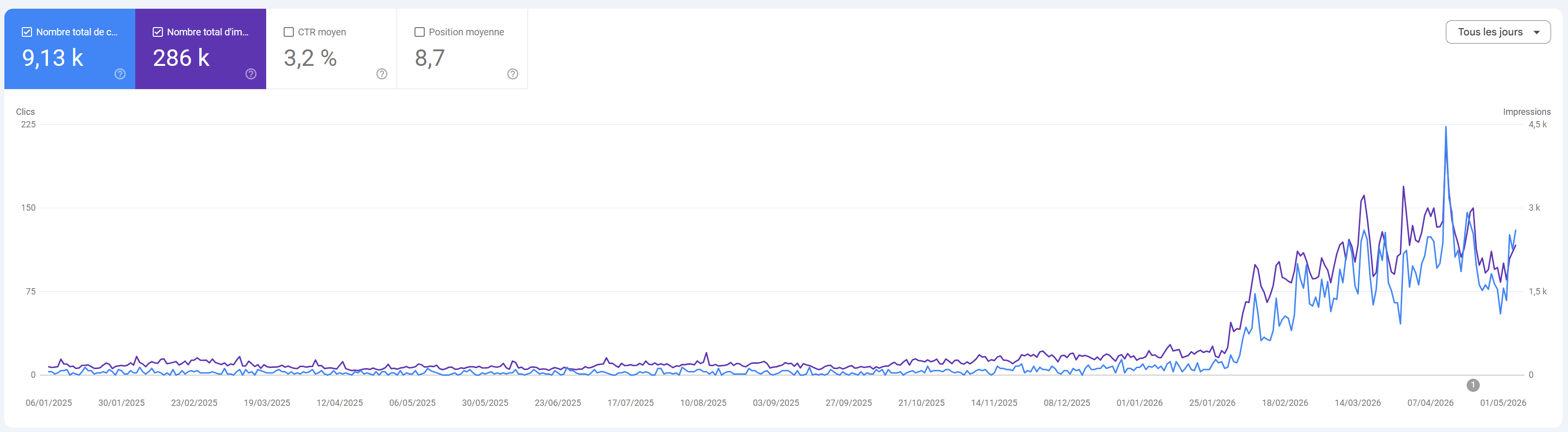
“From 0 to 225 clicks a day in a few months.”
Sébastien BRD · Founder, DLRP Express
💬 5. Concrete prompts that work
Vague prompts get vague answers. Each prompt below names the data source, the time window and the output format, which is all Claude needs once the tools are live. For copy-paste prompts without data, see our SEO prompts for ChatGPT: they work in Claude too.
"What are my quick wins this week?"
Ask for queries in positions 5 to 20 with high impressions and low CTR, grouped by page, sorted by click upside. You get a ranked list instead of a lecture. Ship two of them by Friday.
"Why did my traffic drop?"
Ask for a 28 day comparison split by query, page, device and country, then a verdict: seasonal, a ranking change or an intent shift. Claude is good at this analysis and hopeless without the split data, which is exactly what the Search Console tools hand it.
"Which pages of mine compete for the same query?"
Cannibalization is invisible in a chat window and obvious in a table of page and query pairs. Ask for queries where two or more URLs alternate positions, then decide which page should own the term.
"Build a content brief for the cluster I am weakest on"
Start from your own queries, group them by intent, then pull the live SERP for the winning term. You get a brief grounded in what already ranks, not in what a model remembers.
"Where do competitors have pages that I do not?"
Ask for competitor keywords with volume that map to no URL on your site. That list is your content calendar for the quarter. The full method is in our SEO competitor analysis guide.
📅 6. A realistic workflow
Forget the "Claude runs my SEO" fantasy. The realistic version is a 30 minute Monday loop where Claude does the reading and you make the calls.
- Inventory (5 minutes). Pull 28 day Search Console totals per site. Note the two pages that lost the most clicks.
- Diagnose (10 minutes). Run the drop prompt on those two pages. Separate ranking loss from seasonality before you touch anything.
- Pick three actions (5 minutes). Quick wins, cannibalization fixes, one internal link pass. Three, not thirty.
- Draft one asset (10 minutes). A brief, a rewrite or a new section, grounded in the SERP that currently ranks.
- Log it and measure in 28 days. Same query, same window, same export. That comparison is the only proof that matters.
The skill enforces the format of steps 1 to 4 so you stop re-explaining your process; steps 1 to 3 need numbers, and numbers come from MCP. A skill without data produces tidy nonsense, data without a skill produces raw CSV you still have to interpret. And no MCP server, ChatSEO included, guarantees rankings: it shows you what happened, faster, and the judgment stays yours. That is also the idea behind an AI SEO agent.
❓ FAQ
What is a Claude SEO skill?
A Claude SEO skill is a packaged folder of instructions, scripts and reference files that Claude loads when a task matches it. It encodes a process (checks, steps, output format) rather than data. Think of it as a playbook Claude reads before starting, not a database it queries.
Can Claude read my Google Search Console data?
Not by itself: Claude needs a Google Search Console MCP server or a platform like ChatSEO to reach that data. Once connected, Claude can pull clicks, impressions, CTR and positions per query and per page, then reason about them in the same conversation.
Is there a Google Search Console MCP server?
Yes, there are several, and they differ mostly in how authentication and site linking are handled. Some are self-hosted wrappers around the Search Console API, others are managed servers with OAuth. ChatSEO is a managed option: it handles OAuth 2.1, stores the site and integration mapping, and adds GA, SERP and backlink tools next to Search Console.
ChatSEO MCP or DataForSEO MCP, which one do I need?
ChatSEO for decisions about your own site, DataForSEO for raw market data at volume. ChatSEO reads your Search Console and GA data plus its own SERP, volume and backlink data. DataForSEO bills per call and shines when you need thousands of SERPs. Agencies often run both.
Do I need Claude Code, or does Claude Desktop work?
Both work, and the setup differs by one step. Claude Code takes claude mcp add --transport http chatseo https://api.chatseo.app/mcp and handles OAuth natively. Claude Desktop uses an npx mcp-remote bridge in its config file. Use Claude Code if you want file access and scripts, Desktop if you want a chat window.
Is Claude good enough to replace Semrush or Ahrefs?
No: Claude plus MCP gives you analysis speed, not a proprietary index. What it replaces is the manual export and pivot work you do before analysis, which is where most of the hours actually go.
🏁 The bottom line
Claude SEO is not one tool, it is a stack. Claude is the reasoning layer, a skill is the process layer, and an MCP server is the data layer. Skip the data layer and you are paying for eloquence.
The fastest version: connect Search Console in ChatSEO, run the one line install in Claude Code, and ask the quick wins question on a Monday morning. You will know in ten minutes whether the setup is real, because the numbers will be yours.
- Connect Claude Code to tools via MCP (Claude Code documentation)
- What is the Model Context Protocol?
- Introducing Agent Skills (Anthropic)
- DataForSEO SEO MCP Server
- Semrush MCP documentation