Backlink Gap Analysis: The Links Your Competitors Have and You Don't
 Paul VengeonsCo-Founder & SEO Consultant
In short
A backlink gap analysis lists the domains linking to your competitors but not to you. Pick 3 or 4 competitors, work on referring domains, keep those linking to at least 2, sort by authority, then qualify by hand. The result: 8 to 15 emails a week, not a 4,000 row export.
A list of links won't tell you which ones to win. ChatSEO runs the backlink gap in one prompt and ranks the domains to contact.
Summarize this blog post with:
Which competitor analysis tool is right for you?
Answer 5 questions to discover your ideal tool
A backlink gap analysis compares your backlink profile with the profiles of 2 to 5 competitors and returns the referring domains that link to them but not to you. The output isn't a report, it's a ranked outreach list. You should finish with domains, a reason to contact each one, and a verdict on whether the link is even worth chasing.
Most guides stop at the definition and hand you a spreadsheet template. The hard part is deciding which domains to skip, so that's where this article spends its time: six steps in the right order, the exact menus in four tools, and an example list with verdicts.
⚡ In brief
- A backlink gap is the set of domains linking to competitors but not to you.
- Pull referring domains, never raw links. One domain can send 40 links and still be one opportunity.
- Filter for domains linking to 2 or more competitors before you look at authority.
- Sort by authority to screen, qualify by relevance to decide.
- The finished list is 8 to 15 emails a week, not a 4,000 row export.
🔍 What a backlink gap actually is
A backlink gap needs three things: your domain, 2 to 5 competitor domains, and one direction of comparison. You are looking for domains that link to at least one competitor and to you zero times. Anything else is a different report wearing the same name.
It is not a content gap, which tells you which pages to build, and it is not a toxic link audit. A gap tells you where to show up, a content gap tells you what to publish once you get there. Run the content gap first if your pages are thin, because a great link to a weak page wastes both. Our SEO competitor analysis method covers that side.
Google is clear that links feed both discovery and relevance: it uses links as a signal of relevancy and to find new pages to crawl, per Google Search Central's link best practices. The same documentation puts buying or selling links for ranking purposes at the top of its link spam list. The gap shows you where to earn coverage, never where to buy it.
🪜 How to run a backlink gap analysis, step by step
A first pass takes about 90 minutes, and 20 once you have a template. Do the steps in this order or you'll qualify 400 domains you never needed to see.
1. Pick 2 to 5 competitors
Choose sites that rank for the same queries, sell to the same buyer, and could plausibly lose a click to you. Pick 3 or 4: one gives you nothing to compare and ten turns relevance into noise. Skip the category giant unless you're ready for a list full of domains you'll never land.
2. Pull referring domains
Go to the referring domains report, not the backlinks report. Referring domains count each website once, which is exactly how you want to score interest. Export one file per competitor and keep the domain as a column: you need it for the overlap count.
3. Filter domains linking to 2 or more competitors but not you
This is the heart of the analysis: overlap is your cheapest relevance signal. A domain that linked to three of your four competitors has already said yes to your category. Domains linking to only one competitor often come from a personal relationship, a sponsorship or a paid placement, so treat them as a second pass.
4. Sort by authority and relevance
Sort by Domain Rating, Domain Trust or Authority Score, then read the list with your niche in mind. Authority is a screen, not an answer: a DR 40 trade newsletter can beat a DR 70 lifestyle site. If you wonder how those scores differ, see Moz DA vs Ahrefs DR.
5. Qualify each opportunity
Open every linking page before you add a domain to your list. Check that the page still loads, that the link is in the body and not in a footer, that the mention makes sense, and that you'd want the referral traffic. A link on a page nobody reads is a line in a spreadsheet, not an opportunity.
6. Turn it into an outreach list
One sheet with these columns: domain, contact, email, linking URL, which competitor it links to, your angle, status. Cap it at 8 to 15 domains a week so the personalisation stays real. Every email should reference the specific page, the specific competitor, and one concrete reason you belong there.
🧰 Backlink gap tools: Ahrefs, Semrush, SE Ranking and  ChatSEO
You only need one, usually the one you already pay for. The gap logic is identical everywhere, so pick by menu friction, not by database size. For cheaper options, see our free Ahrefs alternatives.
Ahrefs: Competitive Analysis
In Site Explorer, the Referring domains report shows who links to one competitor: context, not a gap. For the gap, open Competitive Analysis, choose the backlink view, add your domain plus your competitors, and filter on domains linking to all or at least one of them. Keep dofollow, set a Domain Rating floor, sort by DR and export: the "links to" column becomes your overlap score.
Semrush: Backlink Gap, Best tab
Backlink Gap sits in the link building toolkit and compares up to five domains. The Best tab is the one you want: referring domains that link to all the competitors you entered and not to you. Weak, Strong, Shared and Unique answer other questions, so don't mix them. Sort by Authority Score and check the first seen date.
SE Ranking: Backlink Gap Analyzer
Open Competitive Research, then Backlink Gap Analyzer, and enter your domain plus your competitors. The report defaults to domains linking to competitors but not to you, which saves a filter step. Filter to dofollow, sort by Domain Trust, export, then qualify by hand.
ChatSEO: one prompt runs the gap
No export, no dedupe, no merging four CSVs. Ask for the gap in plain language and it works from live backlink data, then returns a prioritised list with its reasoning:
Run a backlink gap analysis against these three competitors. Show me domains that link to at least two of them but not to me, sorted by authority and relevance, and draft one outreach line per domain.
One prompt replaces the export, the merge and the first pass of qualification. Because ChatSEO also reads your Search Console, it can weight the list toward topics where you already have impressions but lack the authority to rank. See the backlink analysis tool, or test the data first with the free SEO tools.

Get this audit in 30 seconds
ChatSEO generates your SEO audit from your real Search Console data.
Results from a ChatSEO customer
From 0 to 225 Google clicks a day
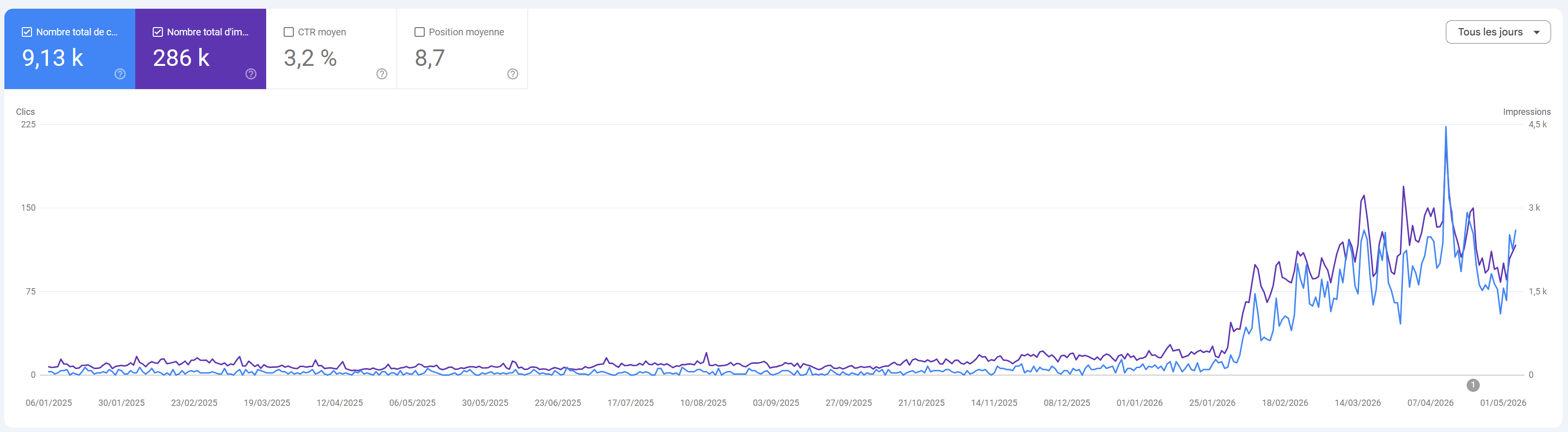
“From 0 to 225 clicks a day in a few months.”
Sébastien BRD · Founder, DLRP Express
🧪 Example: a 4 competitor gap, qualified
Here is what a qualified list looks like once it lands in a sheet. This is an illustrative example, not client data: a B2B software site against four competitors, dofollow only, DR floor at 35.
| Referring domain | DR | Links to competitors | Relevance | Verdict |
|---|---|---|---|---|
| Industry newsletter A | 78 | 4 of 4 | High, weekly tooling roundup | Pursue now |
| Tool directory B | 71 | 4 of 4 | Medium, lists every competitor | Pursue now, free submission |
| Conference site C | 66 | 3 of 4 | High, speaker pages | Nurture, next call for papers |
| Analytics blog D | 62 | 2 of 4 | High, publishes comparisons | Pursue now |
| Podcast E | 58 | 2 of 4 | Medium, guest page | Nurture, pitch a guest slot |
| Agency blog F | 54 | 2 of 4 | Low, guest post farm | Skip |
| Coupon site G | 49 | 3 of 4 | None | Skip |
| Community forum H | 44 | 2 of 4 | Medium, no editorial control | Skip |
| Niche newsletter I | 39 | 2 of 4 | Very high, exact audience | Pursue now |
Nine domains in: four to pursue, two to nurture, three cut. You now have four emails to write instead of nine, and you know why each one exists. Notice the last row: the lowest authority domain is the one to write to first, because its audience is your buyer. And a domain linking to all four competitors is usually a recurring roundup or a directory you simply aren't on yet.
🚫 Mistakes to avoid
- Comparing against the wrong competitor. A media site that ranks for your keywords but sells nothing is a bad benchmark.
- Sorting by authority and stopping there. DR says how strong a profile looks, not whether a domain will say yes or whether its audience converts.
- Counting links instead of domains. Forty links from one site is one relationship.
- Ignoring nofollow links. They don't pass ranking signals, but they still send readers. Judge by traffic and context.
- Copying the competitor's anchor and target page. If your page doesn't answer the query that earned them the link, you're asking an editor to fix your content.
- Turning the gap into a shopping list. Buying links is link spam under Google's spam policies. Earn the mention or walk away.
❓ FAQ
What is the difference between a backlink gap analysis and a link gap analysis?
None in practice: link gap analysis is the same comparison under a shorter name. Both look at referring domains that link to competitors but not to you.
How many competitors should I use?
Three or four is the sweet spot, and five is the ceiling in most tools. More competitors narrow the overlap to the obvious directories, fewer is too noisy to prioritise.
Is there a free backlink gap tool worth using?
Free checkers are fine for a first look at one competitor, usually with a row limit and no bulk export. For a real gap you need 2 or more competitors side by side, so use a paid tool you already have or run the comparison as a prompt against live data.
How often should you run one?
Monthly in a competitive niche, quarterly elsewhere, and every time you publish a linkable asset such as a comparison page or a study, because old lists go stale fast.
Can I just buy the links my competitors have?
No: paying for a link that passes ranking credit is link spam. Use the gap to find the editors, then pitch something only you can offer.
🏁 Conclusion
A backlink gap analysis is one comparison, run in the right order, ending in a short list of domains you can actually win. Pull referring domains, filter for 2 or more competitors, qualify by hand, and pitch 10 a week. The tools make the list, the judgment is the part nobody can export. To go further on tooling, see our best competitor analysis tools.
- Link best practices for Google (Google Search Central)
- Spam policies: link spam (Google Search Central)